Thursday, 20 September 2012

HTC One V Review

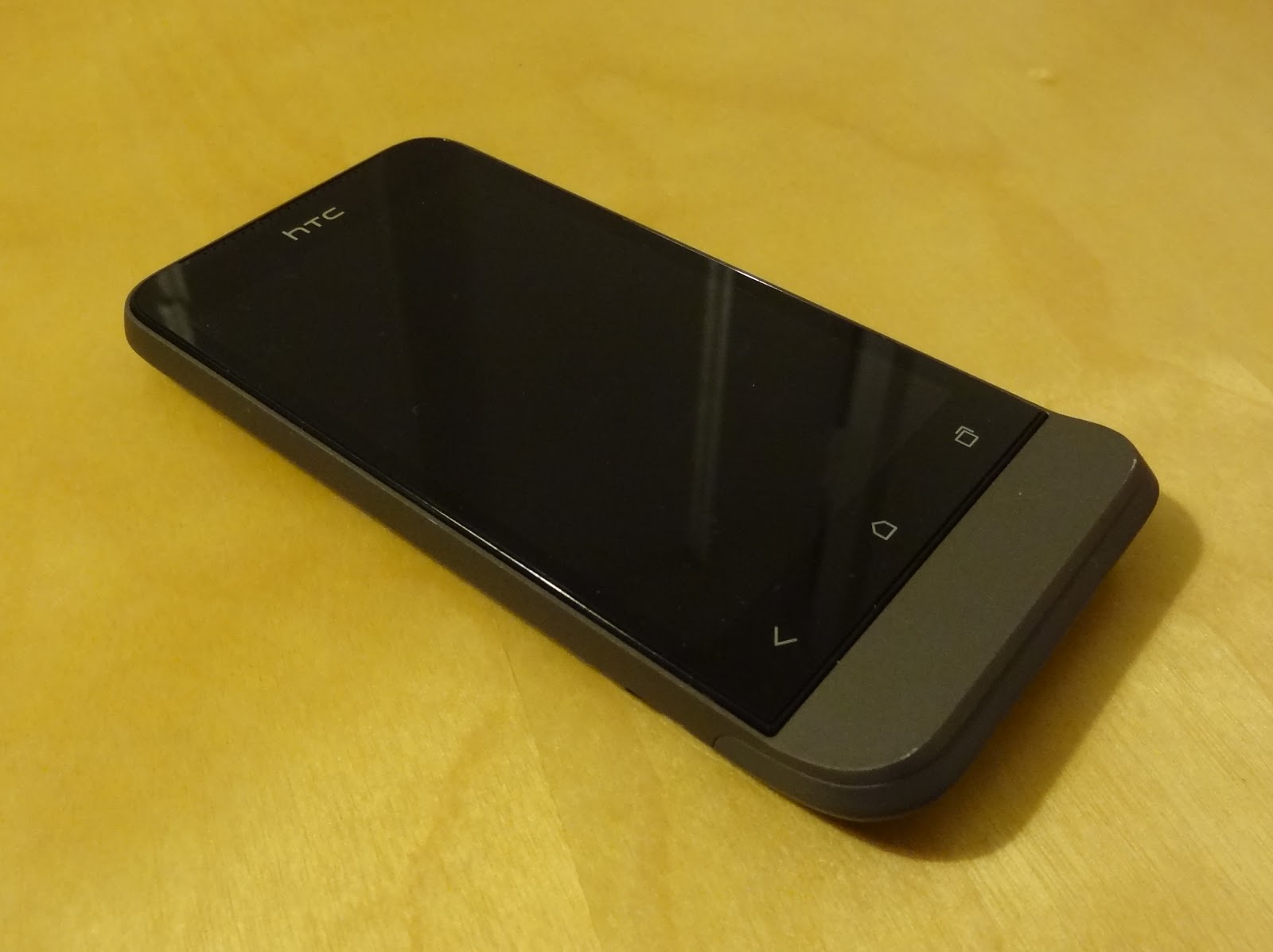
The HTC One V was announced at Mobile World Congress in February 2012, along with its larger siblings the One S and One X. It went on sale in the UK in April, and thanks to Steve and Tim from Phones Show Chat, I've been able to use a review unit as my primary device for the last few weeks. The One V is without a doubt third in the pecking order behind the One S and One X in HTC's first half of 2012 Android line-up, but my penchant for smaller devices has meant the One V was always been the one I was most keen to try out.


HTC One V

Hardware

The design of the chassis is very reminiscent of the Legend, HTC's 2010 phone with an infamous chin. You can in fact trace the heritage of the chin through the Legend, the HTC Hero and all the way to the T-Mobile G1, the phone that first introduced us to Android back in 2008. Also shared with the Legend is the uni-body aluminium construction, making the device feel incredibly sturdy in the hand and giving a sense of quality merely through it's weight alone. That's not too say it feels heavy though; at 115g it certainly isn't overweight, but in direct comparison to its plastic-constructed counterparts you will notice a difference.


Spot the difference! HTC Legend (left) and HTC One V (right)

Part of my keenness to try out the One V was its size, something which ironically would put a lot of smartphone enthusiasts off. At 120mm x 60mm and with a 3.7 inch screen, the One V is much closer to "phone-sized phone" than current flagship devices from all the Android manufacturers. 4 inch screens appear to be the absolute minimum for anything with top end specs, and most flagship devices (see the Galaxy S III, Razr Maxx, Xperia S, Ascend P1, Optimus L7 and One X) are in fact comfortably closer to 4.5 inches. Bezels are getting smaller, and devices thinner, but there is still something about about a 3.5/3.7 inch device that just fits nicely into the pocket in my opinion!

My personal preference is still for a physical home button, something with which only Samsung seem to agree. Unfortunately for me therefore, the One V has backlit capacitive buttons for "back", "home" and "recents" (the three standard navigation system buttons for Android going forward). They work fine though, and we still have physical buttons on the right side of the chassis to control volume, and a power/wake button on the top. Also on top is a notification light, something rarely included in recent handsets.


At the bottom of the One V, on the reverse, you'll find the one break in the aluminium uni-body; a hatch constructed of plastic which houses access to the full-sized SIM card slot, and micro SD card slot. The aerials are also expected to do their work through this area of the chassis, which doesn't work particularly well in my experience. WiFi performance was on par with other plastic-based devices I tested alongside the One V, but GPS performance seemed weak, taking longer than other Android handsets to gain accurate location from cold-start, and losing lock whilst driving using Google Navigation. Tim from Phones Show Chat had also noted poor cellular performance during his testing. There is clearly a cost/benefit analysis to be done for this type of chassis construction, and whilst not disastrous in my testing, it does seem that the solid feel gained from the aluminium body impacts performance of the wireless components.


Plastic hatch reveals SIM and microSD slots


Screen

At time of writing in September 2012, the HTC One X arguably had the title of best screen amongst all the Android handsets on the market. The One X's Super LCD 2 technology, whilst curiously not used in the One S (AMOLED in case you were wondering) is in fact used here for the One V, and the results are stunning. At 800 x 480 WVGA the One V clearly doesn't have the resolution of the flagship One X, or the pixel density (~250ppi against ~310ppi), but the colours are extremely vibrant and the viewing angles amazing, coupled with that feeling that the display is on the glass as opposed to behind it.


The impressive One V screen


Not so impressive is the storage: 1GB for apps and 100MB for media, and a 2GB SD card in the retail package (though not included in the review unit I had). The 1GB space carved out for apps will serve non-geeks just fine, but the chances are that if you're reading this review, it won't be enough for you long-term. The 100MB for your media is nothing but a token gesture, so all media storage hinges on the SD card, and you'll want to swap that measly 2GB card out for a larger one pretty quickly. At least you can swap the card out though, something or a novelty amongst the increasing majority of devices not shipping with micro SD slots.

To wrap up the hardware, the One V has been very light on its 1500 mAh battery. Android devices are notoriously poor in their efforts to get through a single day on charge, an attribute I can confirm with personal experience of over 10 devices I've personally owned and used day-to-day whilst being truly mobile. Recent exceptions like the Galaxy Note and Razr Maxx have included large capacity batteries, but for the One V to last as long as it does in my normal usage pattern, with only 1500 mAh, is very impressive.

Operating System

The core specs of the One V are very mid-range in the current market. A 1GHz single-core Snapdragon CPU pairs an Adreno GPU along with 512MB RAM. This is probably the bare minimum for an Android 4 device such as the One V, and whilst there isn't any appreciable lag around the operating system, you don't get the same fluidity as the Galaxy S III or Galaxy Nexus for example. No less than four software updates were waiting for me on booting up the One V for first time, core app updates and "system updates". I'm not sure why these couldn't be wrapped up into cumulative updates, as the full reboot each time was a pain! I was hoping one of them would be an upgrade from Android 4.0.3 base to 4.0.4, but this wasn't forthcoming. Android 4.1, codenamed Jelly Bean, has been promised for the One S and One X, but at time of writing there has been no word from HTC about the One V.

Regular Android enthusiasts will know that as an HTC device the One V comes with HTC's interpretation of Android, Sense. We're looking at version 4 of Sense, and one which is cut-down from the "main" version of Sense 4, as seen on the One S and One X. HTC inexplicably created their own version of the recents view (aka multitasking) for Sense 4, but presumably due to the system resources required this has been dropped for the One V, with its weaker CPU and lower RAM count. There are also 5 homescreens instead of 7, and fewer 3D transitions when compared to the One V's bigger siblings.


One V Sense/stock mix and match!
Left to right: Sense lock screen, stock recents screen, Sense app drawer

The rest of Sense 4 is however fully in tact, but if HTC had to cut down Sense 4 on ICS to fit the One V's hardware resource limitations, I'm actually not surprised they haven't committed to getting Jelly Bean out to the One V. Not only would Jelly Bean have slightly higher resource requirements, but there may be even more work on the Sense front, cutting even more bits out here and there to again fit the One V's smaller resource limitations.

Now, whilst Sense 4 is less of an eye sore compared to previous incarnations, I still dislike HTC's customisations and general look and feel. They may only be little things, like the effect when scrolling to the end of a menu list, or the circular tick boxes with frustrating colour choices, but when they are as frequently seen as those GUI components are, they can start to annoy. A lot. See below the mix of GUI elements, tick boxes and themes all present in one phone. Interface consistency is certainly one area where iOS and Windows Phone are streets ahead or Sense-based Android phones (and any skinned android phones in fact), and provide yet another good reason for Android manufacturers to lay off their skins and go with stock.


How many themes?
Left to right: Sense Bluetooth, Sense Privacy, SMS Backup+, GMail, Seesmic

I encountered a few bugs during my time with the One V, the first being the WiFi network notification. I turned this off but it still persisted. Through turning it on and off a few times, and a factory reset, this was still the case so, can only presumably be a bug. The second was the lack of calendar notifications, where events with reminders passed without any notification from either the stock calendar app or Business Calendar, whilst notifying on all my other Android devices. Again, this persisted through clearing the calendar app's data, and a factory reset, so again appears to be a genuine bug. Both of these were after checking for updates and being up-to-date, as far as the phone reported.

Camera

Dedicated camera buttons are seemingly on the way out; very few devices are seen with this useful hardware feature, with a few exceptions and camera-centric phones like the Nokia N8 and 808 Pureview. The One V therefore relies like many on screen presses for taking pictures, and focusing, should you wish to compose your shot off centre for example. There is a 5 mega-pixel unit, incorporating HTC's "Imagesense" technology, with a dedicated imaging chip and backside illumination sensor claiming improved low-light performance. This may be true, but I had very varied results with the One V, from decent indoor shots and good outdoor close-ups, to very poor shots of anything past a couple of metres away, see the sample photos below and see what you think.


Sample shots from the HTC One V

Shutter lag is however very minimal, and there is a continuous shooting mode accessed by holding down on the shutter on-screen button. Also impressive is ability to take photos whilst recording video, admittedly recently released in iOS 6 so no longer unique. Video recording is available up to 720p and is again good enough without blowing anyone away.

Conclusion

Living as I prefer and choose to do with smaller phones, I've become far too used to devices like the One V. Its larger siblings, the One S and One X, have far better specs and take all the glory, and the One V is left to splutter along with a slimmed down software experience to match its under-powered hardware. Sure the screen is great, one thing that did make it down from the big daddy One X, and the chassis design incredibly sturdy whilst providing great feel in the hand, but the camera was inconsistent, the software trimmed, and even then not as smooth as the flagship devices, and you really can tell this is handset is firmly in that terrible clichéd "mid-range" territory.


My closing comments apply to HTC as much as Samsung, Sony and all the other Android manufacturers, in that this size of device (under 4 inch screen) does not have to automatically mean that is has to hit the mid-range price bracket. Size of chassis does not have to be proportional to price of handset, and as most flagship handsets are incredibly thin, I no longer believe that the top-range specs could not fit into a chassis the size of the One V, based on overall volume of chassis comparison. I can only assume I'm in a minority and that all the focus groups and consumer studies show otherwise, and that people want larger devices for the large screens, so for now this trend seems unlikely to change.

Friday, 4 May 2012

Samsung Galaxy S3 Event


I was lucky enough to get into the Samsung Mobile Unpacked event tonight, following a tip-off from Steve Litchfield, for the unveiling of the Galaxy S3. There was the standard kitsch presentation with lots of over-the-top “design around humans” type statements, but the main win was getting some hands on time with the device ahead of its European release on 29th May.

Steve had come prepared with the Galaxy Nexus, and straight away you could see the striking similarities in outwards appearance. Versus the more straight edged appearance of the S2, the S3 sports rounded contours around its entire exterior, design to “fit the human hand”, something ever so slightly borrowed from Sony Ericsson some 2 years ago. The two phones are as good as the same size, and pretty similar to the S2, although Samsung have done a good job at squeezing in a 2100 mAh battery whilst keeping the thickness down under 9mm.


Truth be told there weren’t any massive advances in the hardware here. That’s not to say the overall package isn’t great, because it is! The camera seemed much better than the lacklustre performance from the Galaxy Nexus, although borrowing its quick camera app load-time and rapid fire shooting, including a “best photo” feature that fires 8 rapid stills and attempts to pick the best on for you. The 720P 4.8” screen, Super Amoled, looks the same as the Galaxy Nexus’ and probably would shade just under the HTC One X (and yes, if you care, it is PenTile). The exterior casing is in reality Samsung’s usual plastic that doesn’t feel like “just plastic”, although they bucked a recent trend with both a microSD card slot and a removable battery! There are accessories to boot, including wireless charging dock (lovingly borrowed from Palm), HDMI adaptor, desktop and car docks.


Samsung have however mad a real effort in the software department, adding several features above and beyond stock Android. Under the collective banner of Touchwiz Nature UX, you’ll find such things as:
• S Voice which is basically an imitation of Siri
• S Beam which is their version of stock Android Beam from ICS
• Wake Unlock Actions to wake and unlock the phone with voice commands
• Raise the phone to your head whilst reading an SMS from a contact to start dialling them
• Face tagging in photos, with auto sharing to the recognised contacts
• Pop up play, allowing you to leave video playing on top of the rest of the OS

There are more features of course, and this isn’t intended as a full review or even preview! However Samsung have been very busy in the software department, which adds weight to many commentators’ opinions that hardware specs for smartphones are beginning to plateau, with software potentially being the new differentiator. Many criticise the Android OEMs for trying to build their own brand loyalty through skins, frameworks and UIs, even more so as traditionally these company’s expertise lie in hardware not software development, shown up in the early Android incarnations of Sense, TouchWiz, UXP et al.


My gut feel at the end of it all was similar to when the Nexus S came out, and was branded the culmination of this year’s smartphone technology, as opposed to setting out a stall for this year’s new technology. The camera hardware isn’t new, although it borrows some nice speed features from the Galaxy Nexus. Curved design borrowed from Sony Ericsson. Wireless charging borrowed from Palm. S Voice borrowed from Apple’s Siri. The comparatively large battery is welcome though, and for our shores should cope well with 3G radios, with the LTE version faring less of course!

Tuesday, 3 April 2012

Soundwear SD10 Review

After having such a great experience with the Avatalk Jogger, I thought I'd grab some Bluetooth headphones for home/train use, once again banishing the annoying wires. You can pick up the Soundwear SD10s for less than £20 including delivery from the usual online stores, so there were limited expectations at my end before they turned up, but they turned out to be even worse than I thought.
The reasons for trying the SD10s were that they fold up nicely (my self-imposed requirement being small enough to fit in the front pocket of a rucksack), they came with a case, and were powered by internal rechargeable battery. First up, they do indeed fold up nicely, and come with a small velvet pouch - not so much a case that would provide any protection, but pouches do take up less space than hard cases, so not the end of the world.
That's where the good news ends unfortunately. I tried many times to use the SD10s, but they were so uncomfortable I don't think I lasted more than 3 or 4 minutes on each occasion. The edge of the plastic around the ear hook was far too pointed, almost sharp, and dug into the skin around my ears! They were also I believe too heavy for prolonged use.


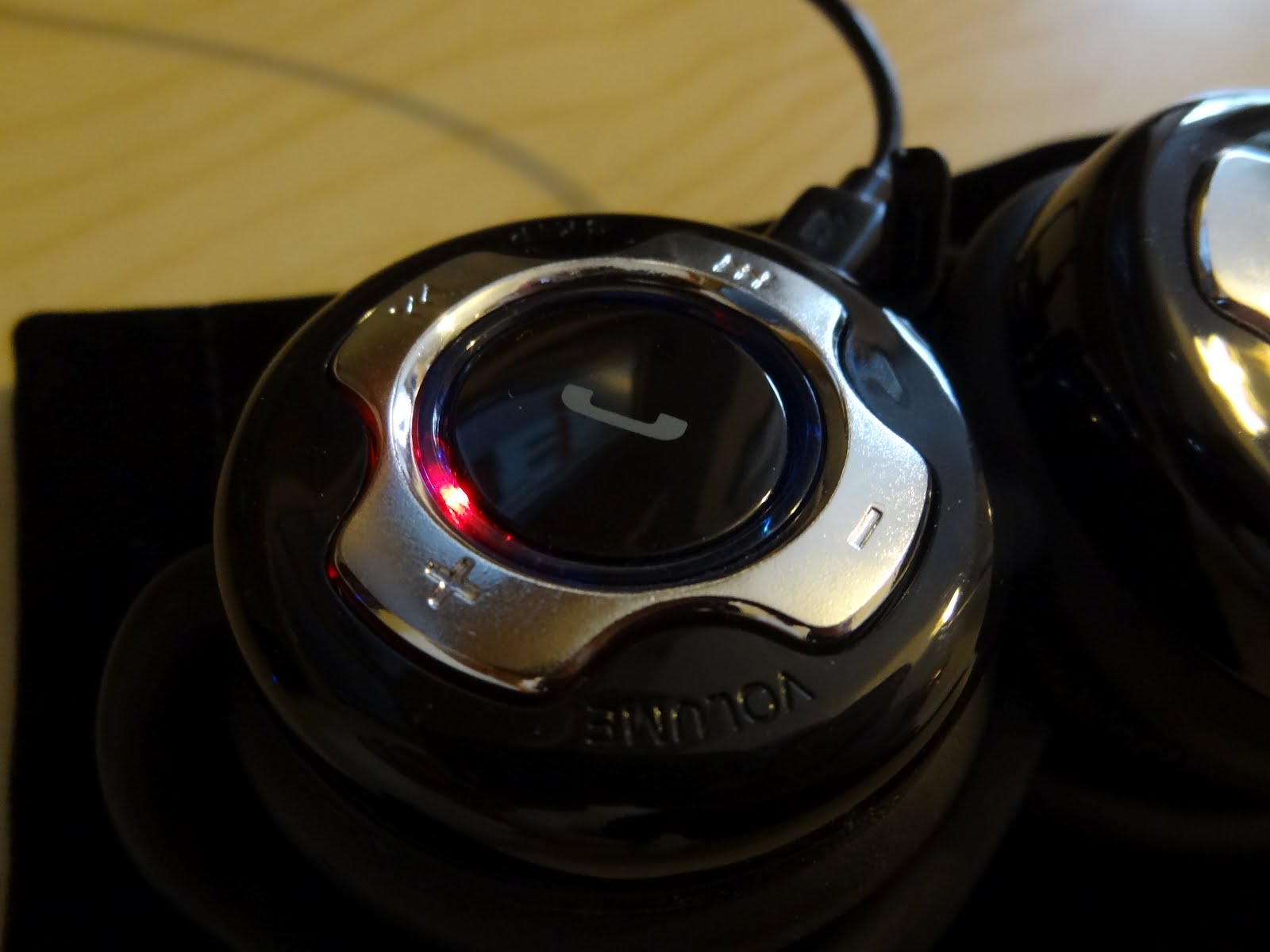
There is a claimed battery life of 20 hours, but I couldn't stand to wear them long enough to test this claim unfortunately. Charging is via mini USB on the side of the right-hand earpiece, with a red notification light to let you know progress.
Here you'll also find forward, reverse, volume up and volume down buttons, arranged circularly around a multifunctional button for start/end call and play/pause. All the buttons are on one earpiece, and I couldn't help but think they would be better laid out across both earpieces.


I would've loved to have picked up a bargain here, but I got what I paid for in the end. It would be hard to recommend the SD10s to anyone as they are so uncomfortable and too heavy for prolonged use, hence the short review and swift re-sale on a local forum!

iPhones Are The Correct Choice, For Everyone Else

My wife, my sister, my sister-in-law, her boyfriend, my brother-in-law, his fiancée, her sister; all these guys now have iPhones. Sadly it's probably for the best.

They have no remote inkling for tinkering whatsoever, quite the opposite in fact. The less time they spend fiddling and setting things up and making them work the better, and the better for me too, as I'm the one they all come to for help! Sure I'd love it if they all had Android devices because that's what I choose myself, and it would be a more familiar OS for me to help them with, but I can't hand on heart recommend Android in the operating system's current state.

They won't worry about the walled garden of the Apple ecosystem and any limitations of iOS, because the restrictions won't be apparent to these non-geek users. iTunes is a horrible piece of work on Windows (apparently much better on OS X, but I can't back that up with no OS X machine in the house), and they all have Windows PCs/laptops. But they won't worry about using the nasty iTunes software for getting their music from PC/laptop to the iPhone, and for the occasional backup, because occasional use wouldn't get you that frustrated. Plus being non-geeks, they have lower expectations of software in general, whereas I expect things to be smooth. In the case of iTunes, I don't expect it to become unresponsive whilst changing the artwork for an album of 12 tracks for example (particularly with 8GB RAM and an SSD under the hood, where exactly does that delay come from?!)

iCloud features will "just work" out of the box, if they even choose to use them, as none of these people have Macs or iPads, so will only benefit from the backup side of it, not the sharing of photos amongst devices. iMessage will again "just work" out of the box, and I reckon half of them won't notice or even care to wonder why certain messages are in different colour bubbles. As long as the person at the other end gets the message, and they get a reply, that's all that matters.

Personally, I have grown accustomed to being to configure everything exactly as I like it, for example:
  • Dropsync sends my photos to Dropbox straight after they are taken. At some point after sat at my PC I will drag photos into folders based on the event or subject matter, and Picasa will face tag them and upload full resolution copies to Google's servers, and then they will all be accessible from every Android device I own; phone, tablet and TV. And that's every photo I've ever taken.
  • Titanium Backup runs on schedules to backup all my apps and their data, and those backups too are sync'd up to Dropbox for safe keeping, should I lose my phone, or want to rebuild from scratch.
  • All the birthdays and addresses of my friends and family are stored in my Google contacts, so reminders for buying birthday cards and navigating to their houses in the car is incredibly simple.
  • I actually have full control of labels, stars and archiving within my Google Mail.
  • I can pick any mp3 music file to use for a ringtone, a message tone, a reminder, and in fact almost any notification noise.
  • My calendar is always on my device's home screen, so I always know exactly what is coming up.
  • Particularly, but not exclusively, with Nexus, Sony Ericsson and HTC devices with unlocked bootloaders, I can actually run the particular custom version of Android I wish to choose. CyanogenMod is a stunning piece of work and has given lots of my phones completely new leases of life, as well as lots of tinkering opportunities!

Some of those are biased to Android because I'm a heavy Google services user, and some may even be possible with iOS, with which I don't profess to be an expert. However, my point is that I want to be able to do these types of "power user" things with my device, whereas the normal user wouldn't be the slightest bit concerned. What will matter to them is things like getting music onto the phone (iTunes), getting all the apps their mates have (App Store still winning here let's face it), maybe the odd backup when one of their mates loses their phone and loses all their photos (iTunes again). These types of tasks are still too involved with an Android device, no matter how much hand holding the Android OEMs put into their GUIs for events like plugging into a PC.

This is why iPhones are, at the moment, the correct choice for everyone else, but not for me (and many other geeks of course).

Tuesday, 10 January 2012

Motorola Droid Razr Maxx Announced With Huge Battery

Motorola yesterday announced the Droid Razr Maxx, an Android Gingerbread phone on Verizon, very similar to the Droid Razr released at the back end of last year, with the biggest difference between the two being the massive 3300 mAh battery. There's no word on a GSM variant yet, but the original Droid Razr made the transition so fingers crossed the Maxx will do the same. The previous biggest battery in an Android phone in the UK was 1930 mAh in the Atrix, unless you count the Samsung Galaxy Note as a phone in which case it was 2500 mAh. The first generation of LTE phones in the US have been known for poor battery life, similar to the first generation of 3G phones which we also saw in the UK, so if Motorola are quoting 21 hours talk time on Verizon LTE, the figure would presumably be even higher on a potential GSM/HSPA variant.

Whilst it's slightly disappointing that the device will launch with Gingerbread, one would suspect ICS will make it to the Droid Razr Maxx (and the Droid Razr) and despite the large battery, the handset is 145g, which for comparison is slightly heavier than the LG Optimus 2X but lighter than all the HTC Sensation line.

Seemingly there are no new wonder battery technologies around the corner, and if you listen to the 361 Degrees podcast or heard my spot in Phones Show Chat 118, you'll know that we all share the same belief as many other commentators that we'd rather sacrifice a millimetre or two in device thickness to gain a few hundred extra mAh to get us through the day! Happily this is the first manufacturer to really go for the idea, and the Droid Razr Maxx is still only 9mm thick, where the original Droid Razr was 7.1mm (at it's thinnest point!).

Whilst there are after market extended batteries for some phones, they have generally either been third party and hence somewhat unreliable, or have added bulges to the handset to ruin it's design. Having the larger battery in the phone from the start has to be the way forward for today's "always connected" smart phones. Good work Motorola, hopefully other manufacturers will follow suit.

Source: Motorola

Tuesday, 3 January 2012

Avantalk Jogger Review

The Avantalk Jogger Bluetooth Stereo Headset was released early in 2010, but I only came across it a few months ago whilst searching for a headset to use in the gym. I've been using it for 4 months now and felt I could give it a review, based on a good amount of usage. I have the black version, but various colours are available, as shown on the Avantalk website.

My use of the Jogger headset has been paired to various mobile phones, for listening to music and podcasts, primarily in the gym. There are many, many Bluetooth headsets out there, but the Jogger sets itself apart from the rest by being very light and being water resistant, which for gym use translates into sweat resistant! The headset comes with a selection of rubber ear bud rings, a USB charging cable, and a pouch to keep all the above together.


For tech spec chasers, the headset supports Bluetooth version 2.1 with the Headset, Handsfree, A2DP and AVRCP Bluetooth profiles, which means most phones will pair with it and be able to play audio output from the phone such as notifications and music, and make/receive phone calls as well.

Photos of the Jogger show it has quite a different design to many headsets; two circular pieces house the ear buds and control buttons, with a rounded band to connect them and also hold the headset in place on your head. Once the earbuds are placed in the ear, the band effectively hugs your head and keep the buds and the whole headset in place. Like me, you may find that when you first put the headset on, it doesn't immediately feel totally secure, but having spent many hours running, cycling and rowing, I can confirm that it has not once felt like slipping, let alone falling off! This is a quite a feat, but then the headset only comes in at 23g, and it's clearly a lot easier to keep a lighter headset in place around your head than a heavier one.


A lightweight headset does lead to worries about lack of battery, but again I've been surprised. Listening time is quoted by Avantalk as 8 hours, but I've been getting more like 10 hours from mine, which for me lasts through several gym sessions without needing to recharge. Advance warning of battery depletion is given through beeps and the notification light on the right side earpiece. The 170 mA battery is rechargable, via the included USB cable. As a small aside, the charging port (shown below) is the same size as the 2mm Nokia charging port from circa 2006 to 2009, and I was able to charge a Nokia 6300 with the Jogger's USB cable!


As shown below, the notification light on the right side earpiece uses blue and red colours for various means; blue when turning on, red for low battery and turning off, and blue/red cycling for pairing mode. The light is positioned next to the multi-function button; long press for power on and off and single press for play/pause or to answer an incoming call. Next door are the next/previous buttons, and on the left earpiece you'll find volume up and down buttons. I found the buttons to be easy to find and use whilst the headset was on, and even before I'd committed the "play/pause on the right, volume on the left" combination to memory, I found I instantly knew which buttons were under my fingers just by touch.


Sound quality has been very good, and the volume has been enough to hear spoken word podcasts above the very significant background noise of not only treadmills and cross-trainers, but the gym's own (usually awful) music. This alone surprised me the most about the headset, although the caveat is that this was at full volume on both the headset and phone, although even then there was no noticeable distortion. My headset has had a fair amount of sweat thrown at it too, and in 4 months of running, rowing and cycling they have so far lived up to their water (and sweat!) resistant claim.

The Avantalk website has an RRP of $49.99 (at time of writing that's £32) but I got them for a sale bargain £21.45; right now MobileFun and Play have them in stock for around £30, which is still a good price considering many other heavier and less comfortable headsets sell for a lot more.

Anyone looking for more volume or audio quality, whilst not needing the water resistance, will no doubt look elsewhere. However, anyone looking for a headset for the gym or any other sporting activity need look no further in my opinion, as long as you don't mind having all the volume dials cranked up to "max" in noisy environments.

Thursday, 8 December 2011

Sony Ericsson and Motorola Explain Android Update Process

In an interesting show of "openness", both Sony Ericsson and Motorola yesterday published blog posts detailing the process they go through to bring their existing devices up to new versions of the Android operating system. With both blog posts published on the same day, it's hard to believe that there wasn't some sort of coordination between the two manufacturers, although Sony Ericsson's post was much more detailed than Motorola's.

For each major new version of Android, Google works with one manufacturer to create the flagship device, called the Google Experience Device. To get the Google Experience Devices out, usually just before the source code is publicly released, the chosen manufacturer will be involved in the development cycle of the new version. Popular belief had been that other major manufacturers (think the likes of Samsung, HTC, Sony Ericsson, LG, and especially Motorola - now very close to being owned by Google) also got some kind of early access to the source code, especially as these are the companies who build Google certified devices with the full suite of Google apps onboard. However, both company's blog posts confirmed (Sony Ericsson's more explicitly than Motorola's) that they too only get access to the new source code on the day it is publicly released. This puts them on the same level playing field as any other lesser known manufacturer who fancies building devices from the AOSP (Android Open Source Project) code only, which is where most of the cheap and nasty tablets have risen from in the past.

Sources: Sony Ericsson Blog, Motorola Blog

Thursday, 27 October 2011

Sony Ericsson Xperia Ray Review

The Sony Ericsson Xperia Ray was released in the UK at the end of August 2011, and having lived with it for over a month I thought it time to my thoughts out on this interesting device.


Form Factor


The size of this phone drew me in from the first time I saw it announced. Between 2007 to 2009 I had two Nokia 6300s, proper phone-sized phones, and at the time it seemed a compromise to move to the extra bulk and weight of the N79 to get the extra features. Fast forward four years and screen size is a upwardly spiralling trend, with the Xperia Ray being the antidote.

Xperia Ray and Nokia 6300

Some stats then. In the UK market there are only two Android phones that are lighter (Sony Ericsson's own X10 Mini and Mini), and only the Galaxy S2 is thinner. There are only three phones that can beat the 53mm width (again Sony Ericsson's X10 Mini and Mini, plus the X10 Mini Pro). Any one or two of those specs would be impressive, but all three means the Xperia Ray is a light, narrow and thin device, much like the phone-sized "feature phones" of 2007!
What Sony Ericsson have managed to do is make the phone small and light, without it feeling cheap or unsubstantial. The device has a slightly rubbered texture on the back making it easy to grip, and this combined with the glass on the front makes for a very solid and reassuring premium feel. The bezel surrounding the screen is very thin too, and has to be for the device to obtain it's narrow dimensions. I've really enjoyed having something that is so pocketable!


Screen


The 3.3" TFT screen has a resolution of 480 by 854, which works out at a very impressive 297 PPI (pixels per inch). The colours and contrast are very impressive too, and along with the high PPI make for a very clear, crisp and high quality viewing experience. The device has Sony Ericsson's "Reality Display with Mobile BRAVIA Engine" which accounts for some of this excellent colour reproduction and even great outdoor performance, if you're happy with a 3.3" screen of course. I've already commented that I like smaller phones, but with the Galaxy S2 and Sensation at 4.3" and the upcoming Galaxy Nexus at 4.65" it seems bigger is seen as better right now, so Xperia Ray would be seen as inferior and a step down in that respect.

Operating System

The Xperia Ray shipped with 2.3.3 version of Gingerbread. Sony Ericsson have really upped their game on the Android front, having admitted they made mistakes and underestimated the demand of users wanting the latest versions of Android, and wanting them pretty quickly. All of Sony Ericsson's Android phones this year, starting with the Xperia Play in Spring, have come out with 2.3 Gingerbread, and SE have already confirmed that all this year's Xperia range will get updated to 4.0 Ice Cream Sandwich.


Staying up-to-date with current version of Android will win Sony Ericsson a lot of friends, especially compared to some other manufacturers' efforts, but also this year they announced they would allow users to unlock the bootloaders on their devices by first following a couple of steps on their website and then following steps for the Android fastboot utility. 


Sony Ericsson also provided devices and knowledge transfer to Android community FreeXperia to expedite the development of highly popular custom ROM CyanogenMod for the Xperia devices, and sure enough, when CM7.1 was released the Ray was in the supported devices list along with the Arc, Play, Neo and others. I plan on moving to the CM7.1 ROM in the near future, once I'm finished writing this up in fact!


Re-ordering the app drawer
Returning to the Sony Ericsson's stock ROM, the customisations on top of Android are lightweight compared to Sense and TouchWiz. They didn't see fit to include the four-corner app launchers seen on the Mini and Mini Pro devices, but their usual app drawer is present, being pretty inoffensive and offering the choice to order apps alphabetically, by last installed, your own custom order, and by most used. There's a lot of Facebook integration in the Xperia Ray, and once you connect your account you'll find your Facebook friend's popping up into your contacts, Facebook events and friend's birthdays popping up your calendar, and your Facebook photos appearing in the gallery app, comments and all!


The five home screens come loaded with some Sony Ericsson widgets for standard functions like toggling services, viewing weather, music play controls, gallery and Timescape, the last two of which are scrollable to go through your history of photos and messaging and social media respectively. They're nice enough widgets, but don't work well on such a small screen. And remember, if you don't like the launcher or the widgets, you can just choose some different ones, and that's why we love Android!

Hardware


I've already mentioned that Sony Ericsson have done a great job of making a light phone feel substantial, and they also ship the Ray with a screen protector on the device in the box. This is applied to the device with perfect alignment and zero bubbles, much better than any human could apply it! There are also a couple more protectors in the box should you need to replace the first one, a nice touch.


Nice home light, but no backlit buttons
The home button has a nice amount of travel, and feels like it hinges rather than pushing down uni-formally. Surrounding the home button is a multi-coloured notification LED, which shows battery status (red when running low), charging status and of course notifications for calls, SMS, email and any other app that has notifications configured. It lights up with a white colour for a couple of seconds after pushing the home button, however, none of the home button and the capacitive back and menu buttons' icons are backlit. This can be pretty annoying in dark conditions, although after a few days I got used to the buttons' locations, but it seems like a cost-cutting exercise or maybe helped to keep the device so thin.


Camera


The first of two big gripes with the camera is the the lack of physical shutter button. It can only be as part of cost-cutting and potentially keeping the device smaller that it has been omitted, which is a shame as Sony Ericsson are marketing this device as having a great camera even in low light conditions. Even the people in that promo video look like they would be more comfortable with a proper button instead of poking at the screen to take a picture! Fortunately Sony Ericsson did include the next-best-thing in that the camera app allows you to focus your shot by holding your finger against the touch screen, then re-framing if necessary, and only taking the shot when you release the touch screen.


The second gripe is that there is no "flash" mode for the LED light that accompanies the camera unit, it is simply a "light" that has to be fully turned on for the duration of framing and taking a photo in dark conditions. It seems none of the third party camera apps can alter this behaviour either unfortunately.

Having said that, the 8.1 megapixel camera performs fairly well, having one of Sony Ericsson's Exmor R sensors , as previously used in the Xperia Arc. They tout the Exmor R sensors as having great performance in low-light conditions, but I wasn't overly impressed. The video camera records 720p resolution at 30fps and the quality of the output is very nice, more impressive than stills in fact. There's also a VGA front-facing camera for self portraits at questionable quality and more likely video calling, with Skype working very well despite the Xperia Ray not currently being on the video calling compatibility list.


Sample Camera Shots:


Media


There are a couple of media based apps included by Sony Ericsson, like TrackID for recognising music albeit slightly less comprehensively than Shazam or SoundHound, and Connected Devices, which lets any DLNA-compatible players on your WiFi network play media from your phone, and it works very well.


Local playback of music through the speakers is better than most phones, and has a very good maximum volume, whilst missing some of the lower frequencies. Video playback on the phone is very good too, again owing performance to the Mobile BRAVIA Engine. However, if you're planning on watching much more than a couple of minutes of YouTube on the 3.3" then you need help.

Battery Life


Along with the camera non-flash and lack of shutter button, another big pain point with the Xperia Ray has been battery life. There had been many other reports of poor battery life which I found surprising as I'd been getting through a whole day fine, and more to the point this should be expected with the small screen. I don't think many people have ever made it more than a day and a half on one full charge on any Android handset, but with a smaller screen to power and a decent 1500mAh battery I thought this might be one to get into two days per charge.


However, whilst I was getting a full day for the first couple of weeks, I now find myself running out of battery in the evening, with very little usage, sat at home a few metres from the WiFi access point, screen timeout on one minute, so nothing out of the ordinary. I have hopes that Sony Ercisson's Android 2.3.4 update will improve this, or maybe the CM7.1 ROM will eek more life out, so I'll have to report on that at a later date.


Conclusion


The wrap-up is fairly easy here, as most smartphone enthusiasts won't be able to see past the small screen size, and maybe even won't look at anything that doesn't have a dual core CPU. Everyone else not concerned with massive screens and other spec wars will see a really nice looking, nice feeling phone that has Android from Sony Ericsson, a company they'll have no doubt heard of. So for that reason, coupled with the low priced contracts it's available on, I could see this shipping a lot of units.


I am, as usual, in the middle somewhere. I don't care about dual core CPUs, HDMI ports, and actively dislike large sized phones, driven by large screens. If Sony Ericsson could have only included a camera shutter button, made the flash bulb operate properly, and sorted the battery life then maybe I wouldn't still be looking for my next phone. Again.


Wednesday, 7 September 2011

Nokia and Samsung Phone Naming Conventions

Catching up with mobile news, and I can't ignore the fact that Nokia has dropped it's old naming convention using N, E, X and C prefixes and within a week Samsung announced it was taking on a very similar naming convention!


Nokia's previous convention had 4 letter identifiers:
"Nseries remains the flagship and most advanced range of products.
Xseries comes next and focuses on social entertainment.
Eseries remains focussed on productivity and business,
whilst Cseries represents the core range of products."


Samsung's new convention has 5 letter identifiers:
"S" (Super Smart) – Devices at the very pinnacle of Samsung's mobile portfolio. This class will only be used on flagship devices such as the Samsung Galaxy S, the award-winning smartphone that has already sold 10 million units throughout the world.
"R" (Royal / Refined) – Premium category models, a combination of power, performance and productivity for the individual who wants to be defined by the technology they carry.
"W" (Wonder) – High quality, strategic models, perfect for those seeking a balance between style and performance.
"M" (Magical) –High-performance models at an economic price-point.
"Y" (Young) – These are entry models or strategic models for emerging markets or a younger audience more sensitive to price.


As well as appending a couple of other identifiers:
“Pro” – This indicates that the device includes a QWERTY keyboard for speedier email typing and increased productivity for professionals. 
“Plus” – This indicates that the device is an upgrade from an existing model. 
“LTE” – This indicates that the device is designed to utilize LTE (Long-Term Evolution) connectivity standards, a 4G standard to provide increased mobile network capacity and speed. 


I can't help thinking that Samsung finding itself needing to use such a bonkers set of naming conventions means they're simply releasing too many phones that are not differentiated enough between each other. HTC and Motorola for example are still using names like "Sensation" and "Atrix" as opposed to any letter and number combinations (although even HTC got bored of thinking of new names and just appended "S" to everything in the last few months), but if these guys concentrated on differentiating the devices a little more, especially on hardware and form factor, just crazy naming conventions wouldn't have ever needed to have been dreamt up!


Sources: Nokia Conversations, Nokia ConversationsKorea Newswire

Thursday, 1 September 2011

Motorola Announces Pro+

Hot on the heals of the announcement of the Defy+, Motorola has announced the Pro+, the successor to the Pro (which never got released in the UK) aka the Droid Pro in the US. And as per the Defy+, the Pro+ is only a minor update. Whilst it will ship with Android 2.3, the original Pro has already been updated to version 2.3, so there's no news there.


Comparing specs, we see the same 1GHz CPU, same 512MB RAM, same size screen, same 5MP LED flash camera, yawn...


Ok, there are some upgrades: the resolution goes from 320x480 HVGA to 480x640 VGA, the weight drops from 134g to 113g, and the battery is bumped up to 1600mAh from 1420mAH, and believe me, having owned a Droid Pro any extra juice will be more than welcome! Internal storage drops from 8GB to 4GB however.


Within a millimetre or two they share the same physical height, width and depth dimensions, but the Pro+ sports more rounded edges compared to the straighter edged Pro, and presumably this will fit much nicer in the hand, and it certainly looks a lot easier on the eye as well.


Motorola had previously announced the old Pro was coming to Europe as the "Motorola Pro" (as opposed to the Verizon branded "Droid Pro"), then this was shelved. Then it was back on again, and now shelved again, although this last cancellation of the Pro at the same time as the Pro+ announcement makes sense of course. Hopefully this time the Pro+ will actually make it to these shores, as the other candybar qwerty Android phones are all mid to low-end devices at best, and it would be nice to see a decent option for this form factor that doesn't require import from the US!


I will however reiterate some things I said about the Defy+ versus it's predecessor; the upgrade seems hardly worth the effort, and we could really do with seeing the RAM rise to nearer the 1GB mark, and probably a dual core CPU to keep up with the other phones that have been released through out 2011. The only reason the Pro+ can be justified in Europe is that the Pro was never released.


Source: Motorola